A vector is a list of numbers with a fixed length. A retriever turns every text into a vector, then scores each passage by comparing the query's vector with the passage's vector. There are two common ways to make this comparison, the dot product and cosine similarity, and in this lesson you compute both by hand.
The need for this showed up at the end of lesson 2. For the query when can I get help from a TA, gave every passage 0. The answer was on the office hours page: Office hours… run by the TAs. The two say the same thing, but they share not a single word.
The ladder for this lesson
The ladder has 4 steps. Under each step you can see what you will be able to do after it.
What you need first: Lesson 2 (query, passage, score, top-K, word overlap). If you already know a step, skip to the next one. A word with a dotted underline and ▾ opens its definition when you click it.
1A list of numbers for a text
A vector is a list of numbers with a fixed length, such as [0.9, 0.1]. How many numbers the list holds is called the vector's dimension. [0.9, 0.1] has dimension 2, and [3, 0, 1, 2] has dimension 4. A retriever needs one score per passage, and numbers are easy to compare, so it turns every text into a vector.
A vector with 2 numbers can be drawn on a plane as an arrow: the first number goes on the x-axis and the second on the y-axis. The arrow from the origin (0, 0) to that point is the vector, and the arrow's direction is the vector's direction.
Now rate each passage by hand on two questions, giving each answer a value between 0 and 2. The first number says how much the passage is about help or office hours. The second number says how much it is about deadlines. Take three passages from lesson 2's corpus. Then add a new one: the course's long FAQ page, which says a lot about both office hours and deadlines. my vectors
Text
Vector
Office hours page
[0.9, 0.1]
Syllabus: the milestone date
[0.1, 0.9]
Project page: the proposal date
[0.2, 0.8]
Course FAQ, a long page
[1.6, 1.4]
Query: when can I get help from a TA
[0.8, 0.2]
The query and the office hours page share no word, yet their vectors are close together: [0.8, 0.2] and [0.9, 0.1]. These numbers are the answers to the two questions, and the two texts got almost the same answers. So a vector can capture a match that counting words misses.
In real systems the dimensions have no such names, and there are hundreds of them, for example 768 in BERT-base vectors. from the paper Here there are 2, so that you can see the vectors on a plane. Every calculation below works the same way with 768 numbers.
Think first
Rate the passage Extra office hours on Zoom this Friday on the same two questions. Roughly what vector do you get, and which passage in the table is it close to?
Show the answer
This passage is entirely about office hours and mentions no deadline. So you get a vector of about [0.9, 0.0], which sits right next to the office hours page at [0.9, 0.1].
2Dot product: the long vector wins
The dot product turns two vectors into one number: multiply the numbers in the same position, then add up all the products. For the query [0.8, 0.2] and the office hours page [0.9, 0.1], it is 0.8 × 0.9 + 0.2 × 0.1 = 0.72 + 0.02 = 0.74. Another name for the dot product is the inner product, and Stanford's slides use that name.
Think first
The FAQ page [1.6, 1.4] does not point in the query's direction as closely as the office hours page does. Will its dot product be smaller or larger than 0.74?
Show the answer
Larger: 0.8 × 1.6 + 0.2 × 1.4 = 1.28 + 0.28 = 1.56. The table below has the other passages too.
Passage
Arithmetic
Dot product
Office hours page[0.9, 0.1]
0.8 × 0.9 + 0.2 × 0.1 = 0.72 + 0.02
0.74
Syllabus[0.1, 0.9]
0.8 × 0.1 + 0.2 × 0.9 = 0.08 + 0.18
0.26
Project page[0.2, 0.8]
0.8 × 0.2 + 0.2 × 0.8 = 0.16 + 0.16
0.32
FAQ page[1.6, 1.4]
0.8 × 1.6 + 0.2 × 1.4 = 1.28 + 0.28
1.56
The FAQ page comes out on top because both of its numbers are large. Its vector is exactly twice [0.8, 0.7]. The query's dot product with [0.8, 0.7] is 0.64 + 0.14 = 0.78, and with the FAQ page it is 1.56 = 2 × 0.78.
Doubling a vector always does this. Every multiplication in a dot product takes one number from that vector. When that number doubles, every product doubles, and so does their sum. So the dot product measures the arrow's length along with its direction, and a long vector can come out on top just because it is long.
In symbols, the same arithmetic is written like this:
a · b = ∑i = 1 … daibi
∑ (sigma) means: keep adding for every i in the range written below it, here from i = 1 up to the dimension d = 2. ai is the query's i-th number, and bi is the office hours page's. So a · b = a1b1 + a2b2 = 0.8 × 0.9 + 0.2 × 0.1 = 0.74.
The dot product is fast, only d multiplications and d additions, and the retrievers in lesson 5 and lesson 12 use it as their score. Its limit showed up above: a passage with a long vector can come out on top even when its direction matches less well.
3Cosine similarity: comparing direction only
Cosine similarity compares only the direction of two vectors, not their length. To do this, it divides the dot product by the product of the two vectors' lengths. So first, learn to find a length.
A vector's length
A vector's length is the length of its arrow. On the plane, the query's arrow is the longest side of a right triangle whose other two sides are 0.8 and 0.2 long. So by Pythagoras, the length is √(0.8² + 0.2²). In other words, square each number, add the squares, then take the square root:
Squares: 0.8 × 0.8 = 0.64, and 0.2 × 0.2 = 0.04.
Sum: 0.64 + 0.04 = 0.68.
Square root: √0.68 = 0.82. The square root is the number that gives the inside number when you multiply it by itself. Check: 0.8246 × 0.8246 = 0.680.
|a| = √( ∑iai2 )
In the same way, the office hours page has length √(0.81 + 0.01) = √0.82 = 0.91.
The dot product divided by both lengths
Now divide the dot product by the product of the two lengths. For the query and the office hours page that is 0.74 ÷ (0.82 × 0.91) = 0.99. This number is called the cosine similarity.
cos(a, b) = a · b|a| × |b|
It is called cosine because this number is the cosine of the angle between the two arrows. For arrows pointing the same way it is 1, at 90° it is 0, and for opposite directions it is −1. The query and the office hours page are about 8° apart, and cos 8° = 0.99.
Here is the same query, with length 0.82, against every passage:
Passage
Dot product
Length
Cosine
Office hours page[0.9, 0.1]
0.74
0.91
0.990.74 ÷ (0.82 × 0.91)
FAQ page[1.6, 1.4]
1.56
2.13
0.891.56 ÷ (0.82 × 2.13)
Project page[0.2, 0.8]
0.32
0.82
0.470.32 ÷ (0.82 × 0.82)
Syllabus[0.1, 0.9]
0.26
?
?
The lengths are rounded to 2 decimals. Each cosine comes from the unrounded numbers, so the last digit of a hand calculation can differ slightly.
Work out the syllabus row
Syllabus = [0.1, 0.9], and its dot product with the query is 0.26. What are the syllabus's length and cosine?
Show the answer
Length = √(0.01 + 0.81) = √0.82 = 0.91. Cosine = 0.26 ÷ (0.82 × 0.91) = 0.35. It is at the bottom, because the syllabus is about deadlines and the query is about getting help.
With cosine, the office hours page comes first and the FAQ page drops to second place. The FAQ page's vector is twice [0.8, 0.7], so its length is twice as large too: 2.126 instead of 1.063. Its dot product had also doubled, and in the division the 2 cancels. So a vector's length has no effect on cosine, and the long page loses its advantage.
Normalizing: vectors of length 1
There is also a shortcut. Divide every number in a vector by the vector's length, and its length becomes 1 while its direction stays the same. This is called normalizing the vector. The normalized query is [0.8 ÷ 0.8246, 0.2 ÷ 0.8246] = [0.970, 0.243], and the normalized office hours page is [0.994, 0.110].
The dot product of normalized vectors is the cosine itself, because both lengths in the denominator are now 1: 0.970 × 0.994 + 0.243 × 0.110 = 0.964 + 0.027 = 0.991. So if every vector in the index is normalized, the dot product and cosine give the same score.
Drag the query's arrow
Click or drag on the plane, and the query's arrow moves there. For the milestone query, the dot product puts the FAQ page on top, and cosine puts the syllabus on top.
Passage
Vector
Dot product
Cosine
Cosine has a limit too: it ignores length completely, and sometimes length carries useful information. A way of turning two vectors into a similarity number is called a similarity metric. Which metric to use depends on the metric the model that makes the vectors was trained with.
4Embedding model: a vector for any text, automatically
The vectors above were made by hand, by asking two questions. That cannot be done by hand for the 60,000 passages of lesson 2's company, and two questions cannot capture everything a text says. So we need a program that gives any text a vector automatically.
An embedding is the vector a trained model produces for a text, so that texts saying similar things get vectors pointing in similar directions. The model that reads a text and produces its embedding is called an embedding model or an encoder. An encoder is also made of the from lesson 1.
Training shows the encoder pairs of texts that say the same thing, and pairs that do not. It then changes the parameters so that the score of the first kind of pair goes up and the score of the second kind goes down. Lesson 12 covers this training in full.
Now return to the TA query. Use the encoder to make the query's embedding, and compute its cosine with lesson 2's passages. The result might look like this: my numbers, not from a real model
Passage
Shared words
Cosine
Office hours pageOffice hours: Tuesday 4pm in Room 104 and Thursday 9am on Zoom, run by the TAs.
Homework 1 announcementHomework 1 will be released on Oct 5.
0
0.22
SyllabusGrading. The project milestone is due Week 6 …
0
0.15
The query and the office hours page share no word, yet the office hours page is on top with 0.78. Where lesson 2's retriever gave every passage 0, the embedding retriever brings the right passage to the top.
Offline and online
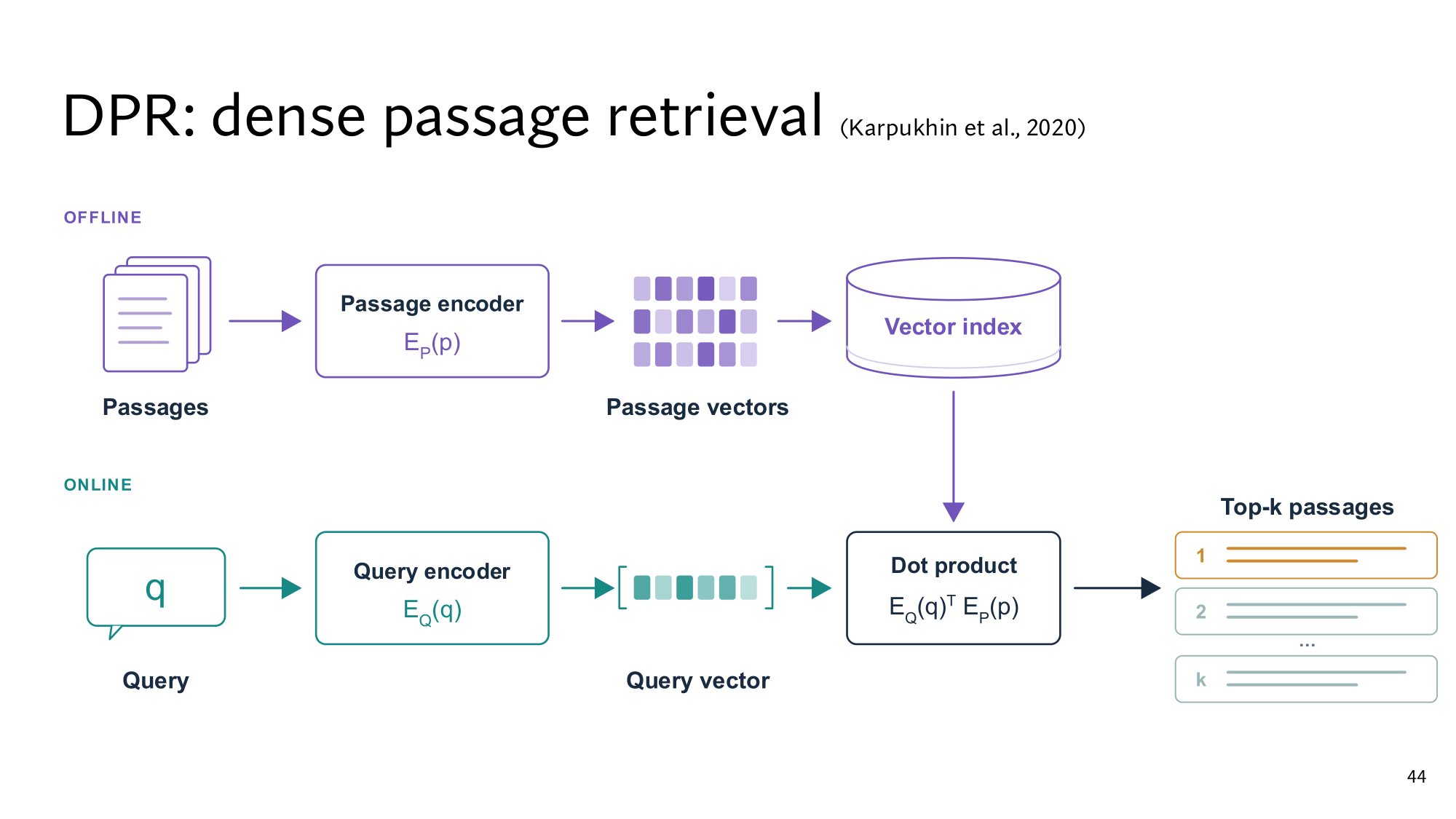
An embedding retriever runs in two parts. Offline, before any query arrives, the encoder makes each passage's embedding once. This list of embeddings, built in advance, is called the index. Online, on every query, the encoder makes only the query's embedding. Then its cosine or dot product with every embedding in the index is computed, and the K passages with the highest scores come back.
Stanford's DPR slide shows these same two parts. The DPR of lesson 12 has two separate encoders: EP for passages and EQ for the query. The EQ(q)⊤ EP(p) in the slide's box is the dot product of the two vectors, and the is one way of writing it.
Stanford's slide: the offline part of DPR at the top, and the online part at the bottom. Click the image to open it at full size.
An embedding retriever has two limits that later lessons deal with. First, it can miss things that must match exactly: passages with error codes E-4012 and E-4021 can get almost the same embedding. Lesson 14 solves this. Second, every query is compared with every embedding in the index, so 60,000 passages mean 60,000 cosines per query. With tens of millions of passages this gets slow, and lesson 10 solves that.
Think first
A new passage is added to the corpus. What does the embedding retriever have to do?
Show the answer
The encoder makes the embedding of that one passage, and you add it to the index. The rest of the index stays as it is. Each query still needs only one new embedding, the query's.
What the dense version adds
The dense version contains this whole lesson, followed by 5 more steps that take you to the level of the Stanford slides:
Step 5: why cosine is the cosine of an angle, and why it always stays between −1 and 1.
Step 6: how the dot product, cosine and distance relate, and why the DPR paper chose the dot product.
Step 7: matrices and the transpose, so that the whole index is scored in one multiplication.
Step 8: the five kinds of embeddings in Stanford's table, and why a rare error code gets lost in a single vector.
Step 9: Stanford's three slides, which you read yourself.
A vector is a list of numbers with a fixed length. Two vectors are compared with the dot product or cosine similarity.
The dot product measures length along with direction, so the long FAQ page came out on top with 1.56. Cosine looks only at direction, and on normalized vectors the two give the same score.
An embedding model makes a vector for any text, so that texts saying similar things point in similar directions. Passage embeddings sit in an offline index, and each query needs only the query's embedding.
New terms in this lesson
Vector
A list of numbers with a fixed length, such as [0.9, 0.1]. With 2 numbers, it is an arrow on a plane.
Dimension
How many numbers a vector has. For example, [0.9, 0.1] has dimension 2, and BERT-base vectors have 768.
Dot product (inner product)
Multiply the numbers in the same position, then add them all. For example, [0.8, 0.2] and [0.9, 0.1]: 0.72 + 0.02 = 0.74.
∑ (sigma)
Keep adding over the range written below it. For example, the sum of aibi for i = 1 to 2 is a1b1 + a2b2.
Length
The length of the arrow: square each number, add the squares, take the square root. For example, [0.8, 0.2] has length √(0.64 + 0.04) = 0.82.
Cosine similarity
The dot product divided by the product of both lengths. It looks only at direction and stays between −1 and 1. For example, 0.74 ÷ (0.82 × 0.91) = 0.99.
Normalize
Divide every number in a vector by its length, so the length becomes 1 and the direction stays the same. For example, [0.8, 0.2] ÷ 0.82 = [0.97, 0.24].
Embedding
A text's vector, produced by a trained model. Texts saying similar things point in similar directions, such as “help from a TA” and “run by the TAs”.
Embedding model (encoder)
A model that reads a text and produces its fixed-length embedding. For example, turning the query into a vector like [0.8, 0.2].
Index
The list of passage embeddings built in advance. For example, 60,000 vectors for 60,000 passages.
Offline and online
Offline: once, before any query arrives, such as building the passage embeddings. Online: on every query, such as making the query's embedding.